Orders Get Lost Between Floor and Kitchen
A slip is misread or never arrives. The table waits, the item is remade, and the cost of it never appears anywhere.
Restaurant POS software with kitchen order tickets, table and counter billing, recipe-level stock, delivery orders and true dish costing — built for restaurants, cafes and fast-food counters. Open the working system first.
No sign-up to see the demo · Plans from $15/month · Nothing charged until day 15
Not in one bad night — in a few plates a day that nobody can account for by the end of the month.
A slip is misread or never arrives. The table waits, the item is remade, and the cost of it never appears anywhere.
You price by what the place down the road charges. Whether the dish makes money after the chicken, oil and gas is a hope, not a number.
Ten kilos came in, the sales say six were used, and the difference is discovered weeks later with no way to trace it.
Dine-in, takeaway and delivery on one screen. Split bills, merge tables and move an order without restarting it.
The order prints or appears in the kitchen the moment it is taken, so nothing depends on a handwritten slip surviving the walk.
Each dish is linked to its ingredients, so selling a plate reduces the chicken, the oil and the packaging. Variance stops being invisible.
Cost per plate against selling price, per item. You find out which popular dish is quietly losing money.
Phone and walk-in takeaway orders, rider assignment and order status, in the same till as dine-in.
Sales by shift, by waiter and by payment type, so the cash at close is checked against something.
Tables, orders and the kitchen screen from the working demo, loaded with sample data. Open the demo and try it yourself.
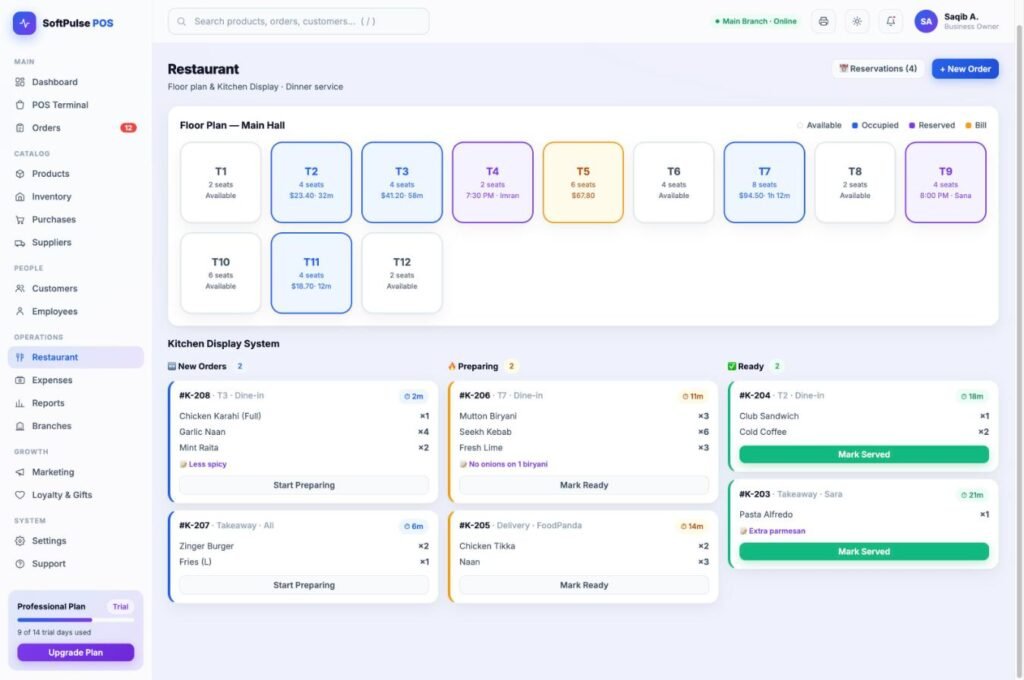
Sample data is already loaded. Click around, make a mistake, break something — it resets.
The front of the business, set up the way this kind of operation actually runs day to day.
The billing, stock and reporting engine underneath — the same system every version is built on.
We would rather tell you now than after you have spent a week setting it up.
Table billing and kitchen tickets start on Standard. Recipe costing and multi-outlet reporting sit on Professional.
Core billing and records for a single location. 1 branch, 2 users.
Adds the features this business actually runs on, plus profit reports. 2 branches, 5 users.
Full system with advanced reporting. 5 branches, unlimited users.
Open the restaurant demo, or send us your menu and we will load it into your free trial so you are testing with your own dishes.
Start Your Free Trial