Health Store POS Software

Supplements, vitamins and over-the-counter medicine on the same shelf, and every one of them carrying a date. This is health store POS software that records batch and expiry as stock comes in, keeps the rate you actually paid, and tells you at closing what the day really earned.

Sample stock already loaded · No sign-up · Plans from $15/month

Why an Ordinary Till Struggles

Most POS Software Was Written for Shops Selling Things That Do Not Go Off

A clothing shop’s stock is the same stock in two years. A health store’s is not, and that one difference changes what the software has to do.

Everything Has a Date, and They Are All Different

A tub of whey has eighteen months on it. A box of ORS sachets has three years. The syrup in the chiller has nine. One shelf can hold four different expiry horizons, and a till that only counts units cannot see a single one of them.
The Same Product, Three Different Costs

You bought the multivitamin at one rate in spring, a better rate when you took a full case, and a worse one last week because you ran short. Sell a bottle and the margin depends on which box it came out of. Nobody writes that down.

The Loss Nobody Books

Expired stock is rarely one dramatic write-off. It is two boxes this month, three the next, found when a customer turns the pack over and reads the date out loud at the counter.

What the System Does About It

Six Things, Each One Aimed at a Real Loss

Batch and Expiry Recorded at Intake

The date goes in once, when the delivery is unpacked — not later, not from memory. It takes about twenty seconds per line and it is the step everything else depends on.

The Expiry List, Every Morning

One screen showing what expires in the next sixty and ninety days. Early enough that the supplier will still take it back, or that a shelf-edge discount can still move it.

Purchase Rates Kept Per Batch

Each delivery keeps its own cost. When a bottle sells, the profit is calculated against what that bottle actually cost you, not an average someone typed in six months ago.

Barcode Billing Built for Small Items

Health stores carry hundreds of near-identical packs in three strengths and four flavours. Scanning is the only honest way to bill them quickly without picking the wrong one.

Daily Profit, Not Just Daily Sales

Takings tell you what came in. The profit line tells you what you kept, split by product, so the slow-earning shelf stops hiding behind the fast-moving one.

Staff Logins With Real Limits

The person on the counter bills and looks up stock. Discounts, purchase rates and the profit report stay with you. Every sale carries the name of whoever rang it.

See It Working

Expiry Batches and Profit, One Screen Each

Real screens from the working demo, loaded with sample data. Open the demo and click through them yourself.

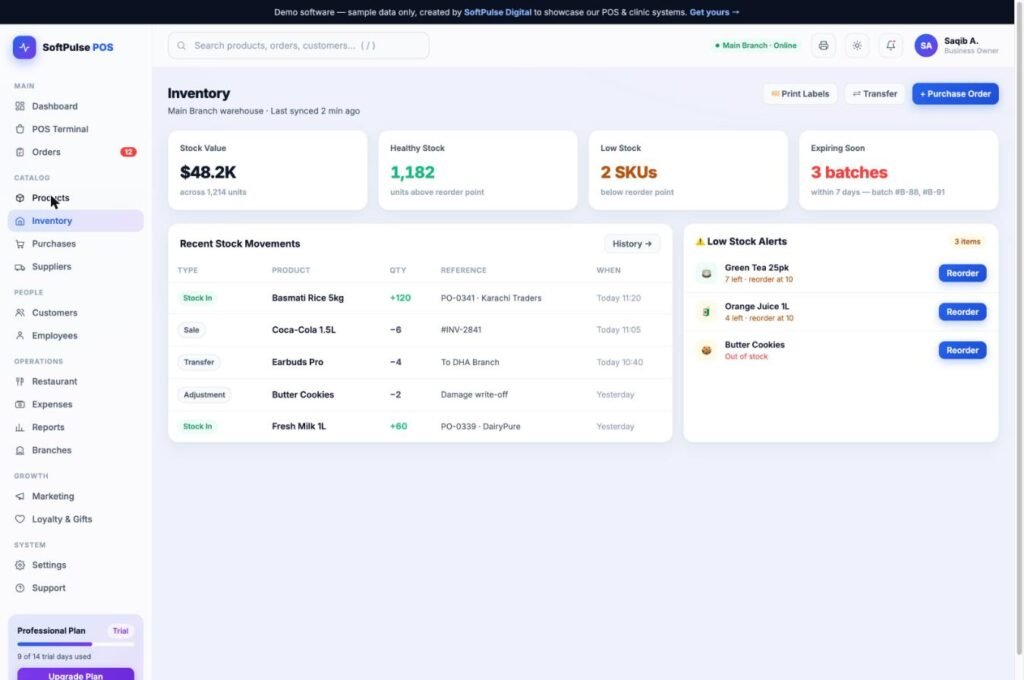
Health store POS inventory screen showing stock value, low stock alerts and batches expiring within 7 days
Inventory with expiry and batches. Every batch has its own expiry date, so the items about to go off show up before they do.
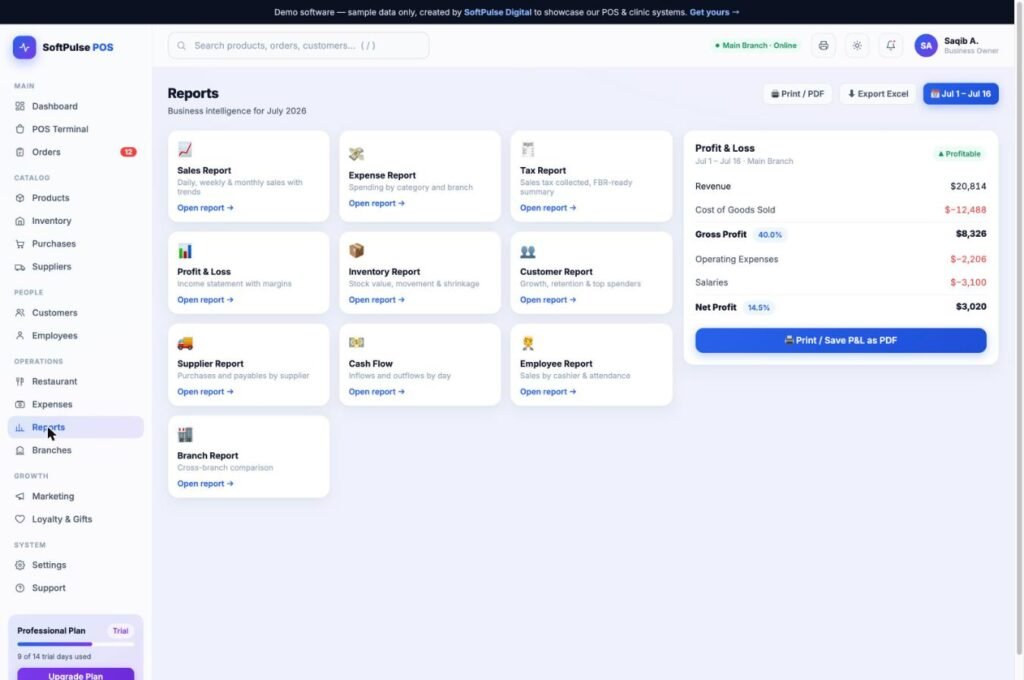
POS software reports screen with profit and loss, sales, tax and supplier reports
Profit reports. Sales, cost and margin per product, so you can see what actually makes money.

Open the Working Demo

What It Actually Looks Like

A Tuesday, From Open to Close

Not a feature list — the three moments in a day where the software either earns its place or does not.

Morning

You open the dashboard and the expiry list has four lines on it. Calcium tablets, sixty days out. Two flavours of protein, ninety. A box of glucose powder you had forgotten was in the back. You ring the supplier about the calcium, mark the protein for a shelf-edge discount, and move the glucose to the front. Eleven minutes, and it is the whole job.

Afternoon

A regular wants the same fish oil she bought last month and cannot remember the brand. You search her number, the last bill comes up, and she is out of the shop in forty seconds with the right pack. That is the part customers notice, and it costs nothing to have.

Closing

Takings for the day, and next to them the profit. Usually a little lower than the owner guessed, because the discounts and the expensive batch are both in the number. Most people find that uncomfortable for about a week, and useful for years after.

Straight Answers

What This Is Not

Four things it will not do. Better you read them now than find out in week three.

Not a Controlled-Drug Dispensing System

It bills over-the-counter medicine and supplements. If your country requires a licensed dispensing register with prescriber records for scheduled drugs, this is not that system and we will say so before you pay.

No Insurance or Claim Processing

There is no panel billing and no claim submission. Every sale here is a cash, card or account sale.

It Needs an Internet Connection

This is cloud software, so billing needs a connection. If your area loses power or signal for hours at a time, tell us first and we will tell you honestly whether to buy it.

Not a Wholesale Distribution System

A shop that also sends out a few bulk orders is fine. A full distributor with sales reps, territories and route delivery needs something heavier than this.

Getting Started

The First Week Is the Part That Stops People

Loading your stock is the real work, so we do that part with you rather than handing you an empty system and wishing you luck.

Day One — Your Stock Goes In

Send whatever you already have. An Excel sheet, an export from old software, or photographs of the register pages. We load it and send it back for you to check.

Day Two — Barcodes and Rates

Scan through a shelf or two so the codes attach to the right products, and put in the current purchase rates. Expiry dates get added as each new delivery arrives, not all at once.

Day Three — The Counter Tries It

Hand the billing screen to whoever actually serves customers and let them break it. Their opinion after ten real sales is worth more than any demo.

The Rest of the Trial — Run It Alongside

Keep the old register going for a week. When the two agree at closing time three days running, switch off the old one. Nobody should take that on trust.

Pricing

What a Health Store Usually Needs

Expiry alerts and batch tracking start on Standard. One shop on Starter, and Professional only if you are running several.

Starter
$15/mo

Billing, stock and daily sales for a single shop. 1 branch, 2 users.

Professional
$49/mo

Several shops on one account, with patients and consultation if a clinic sits alongside. 5 branches, unlimited users.

Compare Full Plans

FAQ

Questions Health Store Owners Actually Ask

Not for the stock already on your shelves. Start with what you can see easily and let the rest fill in as deliveries arrive, because a delivery is already being unpacked and checked. Shops that try to date every existing item in one sitting usually give up on day two.
Loose items are sold by unit or weight with a price per unit, so honey by the kilo or capsules by the strip both work. A weighing scale can be connected, though most shops type the weight and find it fast enough.
It is the reason the report works. Every delivery keeps its own rate against its own batch, so a changing cost is recorded rather than averaged away. This is exactly where a general retail till gives you a comfortable but wrong number.
Almost certainly. Any scanner that behaves like a keyboard, which is nearly all of them, needs no driver and no setup. The same is true of most thermal receipt printers you may already have at the counter.
Underneath it is the same system, set up differently. The pharmacy and medical store version leans harder on medicine records and can sit next to a clinic. The health store setup puts supplements, retail packs and barcode speed first. If you are honestly somewhere between the two, say so and we will set up whichever fits your counter.
Yes, and you should ask that of anyone selling you software. Your products, purchases, customers and sales export to a spreadsheet whenever you want, including on the way out.

Open It Before You Decide Anything

The demo has stock already loaded, so you can bill something, check an expiry list and look at a profit report in about five minutes. Or send us your product list and we will set the trial up with your own shelves in it.

Start Your Free Trial

Still comparing? Read How to Choose POS Software for a Medical Store — six checks and the questions worth asking any vendor before you pay.